The ProjectXL Journey System
The ProjectXL Journey System interprets project state, journey context, and evidence to show users what matters now and what to do next.
ProjectXL was originally envisioned as a replacement for MS Project, but its scope has expanded into a broader project planning and control system. It now combines schedule modeling with a cost engine, fund management, and version control capabilities, which means the product has to coordinate several kinds of work that MS Project did not need to manage together.
That broader scope creates a structural problem: the capabilities are most useful when they are integrated into a single operating model, but that integration also introduces prerequisites, sequencing concerns, and more decisions for the user to understand. The result is a more capable tool with a steeper learning curve.
The Journey System is intended to solve that adoption problem. It gives ProjectXL a way to interpret workbook state, understand the user's current journey, and present the right guidance at the right time. The rest of this article explains what the Journey System is, how it works, how it shapes the user experience, and why it makes the broader ProjectXL platform easier to adopt and use effectively.
What is the ProjectXL Journey System?
The Journey System is the current architectural authority for journey behavior. It is the part of the runtime that decides what the user should see, what work should be available, and how the application should respond as the workbook changes.
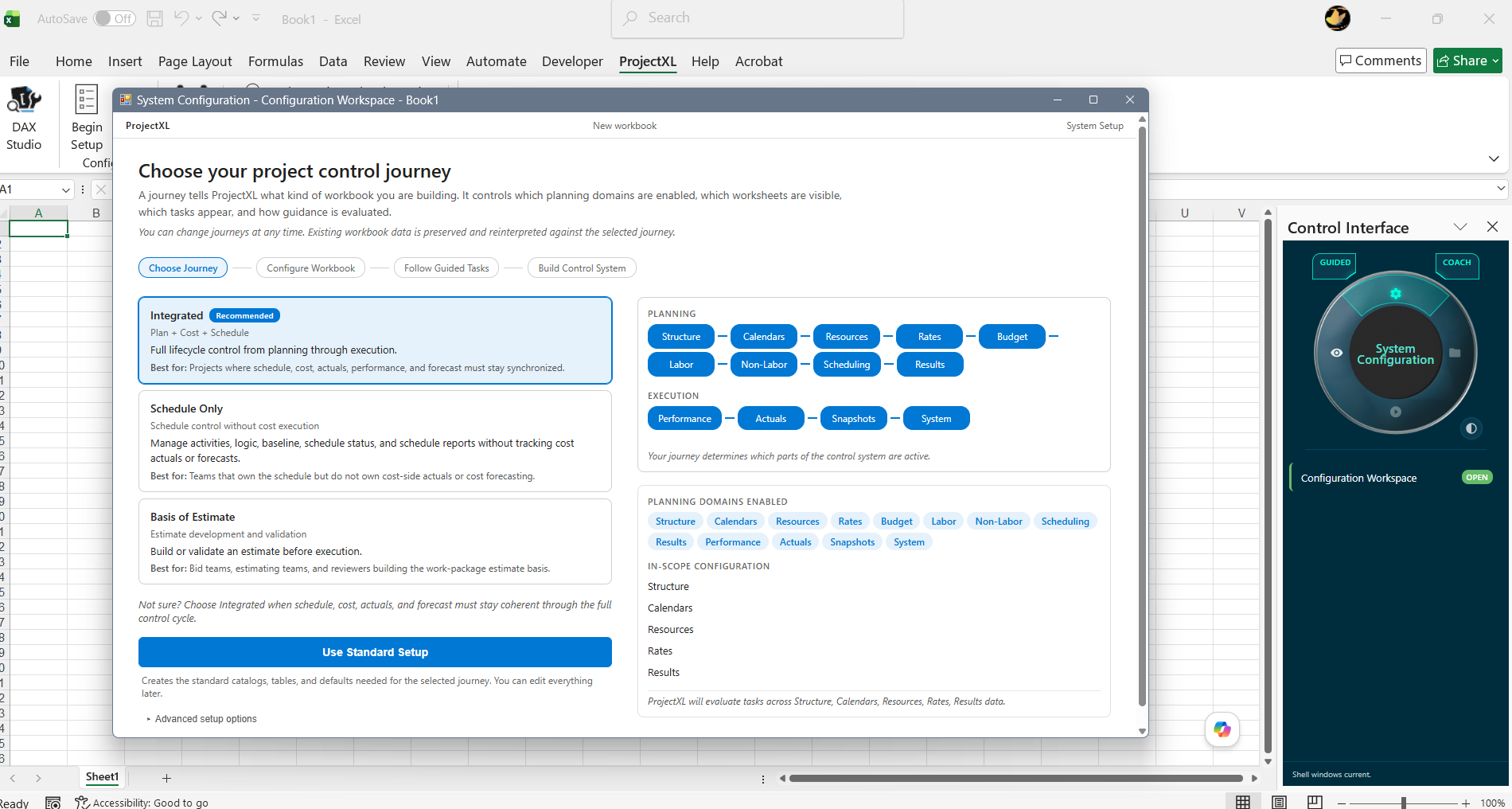
The journey model supports different kinds of ProjectXL work without forcing every user into the same path:
The Integrated Journey is the broadest path through ProjectXL. It is intended for teams that need the full planning and control model working together, including schedule development, cost structure, baseline management, actuals, performance, and the other coordination points that make the platform more than a scheduling tool. In practice, this is the journey for projects that are being managed as an integrated operating system, where the user needs the application to connect planning decisions to execution evidence over time.
The Schedule Only Journey is narrower by design. It keeps the scheduling surfaces and schedule-governance work in view, but it does not ask the user to operate through the same cost and financial maintenance expectations when those parts of the model are not relevant. That makes it useful for teams that still need disciplined schedule control, but are not using ProjectXL as the system of record for the broader cost-side lifecycle. The project facts remain the same workbook facts underneath, but the journey focuses the experience on schedule work rather than on integrated control.
The Basis of Estimate Journey is aimed at the earlier part of the lifecycle, when the main job is to shape an estimate, define planning assumptions, and build enough structure to support decision-making before execution begins. It emphasizes pre-execution planning work and stops short of the recurring execution workflows that belong to a live delivery environment. That makes it a better fit when the project is still being framed, priced, or prepared, and the user needs guidance that supports estimating discipline without bringing in later-stage maintenance tasks too early.
Choosing the right journey is not a one-time commitment made at project setup. Because each journey works from the same workbook facts, the project can move from one journey to another as its lifecycle changes. A team might begin in a Basis of Estimate posture while defining scope and assumptions, continue in a Schedule Only posture while building and refining the plan, and then switch into the Integrated Journey once execution, cost tracking, and performance management become active concerns. That is what makes the journey model practical: it lets ProjectXL keep the guidance aligned to the project's current phase of work without forcing the user to start over or rebuild the underlying project state.
How the Journey System Works
The Journey System begins by looking at two things together: the journey the user has selected and the facts the workbook already contains. The workbook holds the durable truth about the project, such as structure, planning completeness, baselines, actuals, funding, and other operating data. The selected journey does not rewrite those facts or create a different version of the project. Instead, it acts like a lens over the same workbook and tells the runtime which facts matter right now, which stage the project appears to be in, and which kinds of work should be treated as relevant.
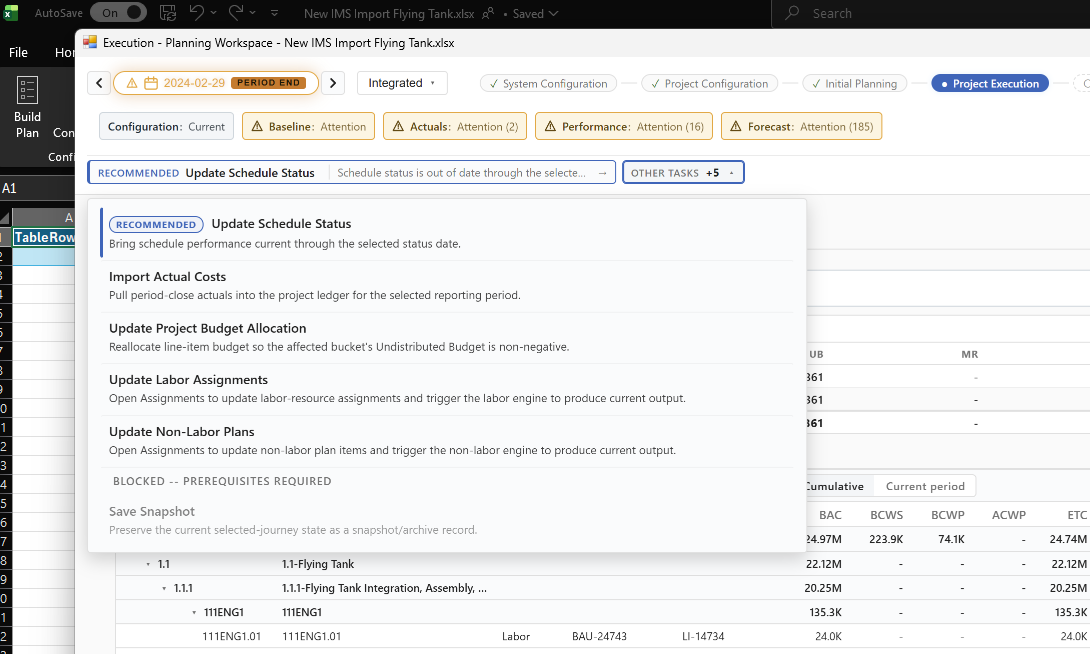
From there, the system evaluates the evidence it can see and turns that evaluation into a projection for the user. If the workbook shows that a baseline exists, actuals are current, or a prerequisite is still missing, the Journey System uses those signals to decide what should be available, what should be blocked, and what deserves attention next. That is how it knows whether to show a task as ready, warn that something is incomplete, or explain that a step cannot proceed yet. The important point is that the runtime is not guessing. It is re-evaluating the current workbook state against the rules of the active journey each time the workbook changes or the user switches to a different journey.
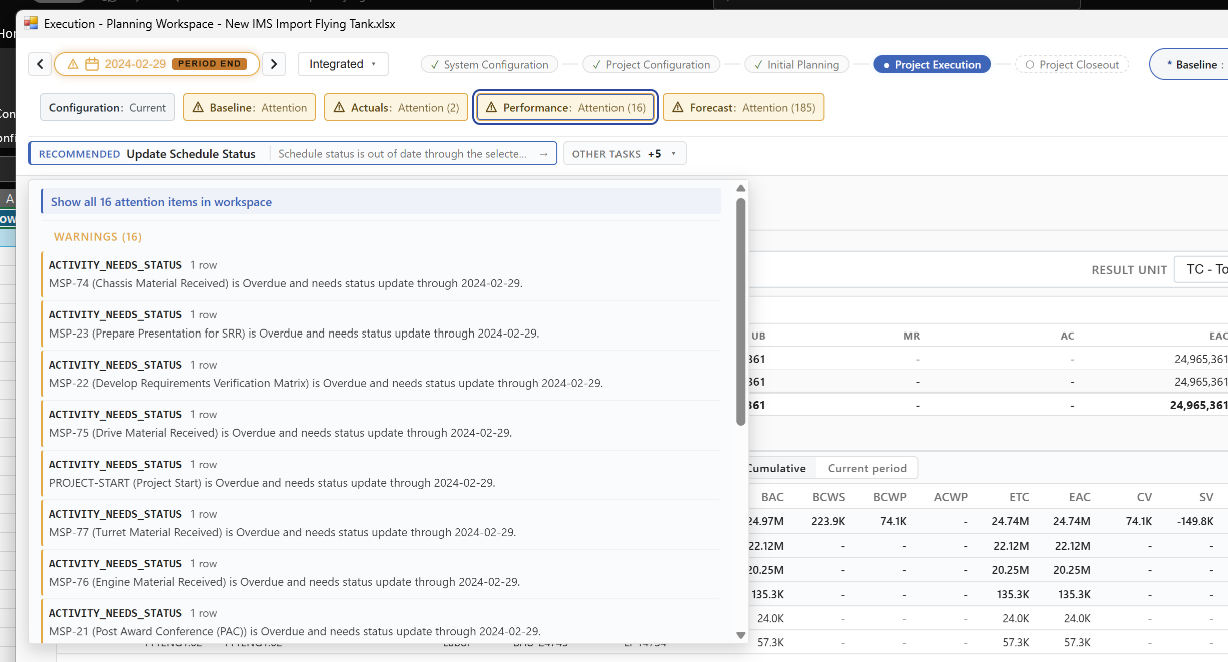
What the user sees is the result of that projection. The chip strip, recommendations, blocked work, and active workflows are all the Journey System's current reading of the project, not a static menu. When the workbook supports progress, the interface can move the user forward on the same surface or guide them to the next workspace that fits the current task. When the workbook is not ready, the system can show what is missing and why. In that way, the Journey System serves as the interpreter between project state and user experience, continuously deciding what to display so the next action makes sense in context.
The User Experience
The Journey System gives the interface its operating logic. What the user sees on screen is a guided surface that is continually being informed by the current journey, the workbook state, and the evidence the runtime can verify. This lets the user understand where they are, what matters now, and what action the system believes makes sense next.
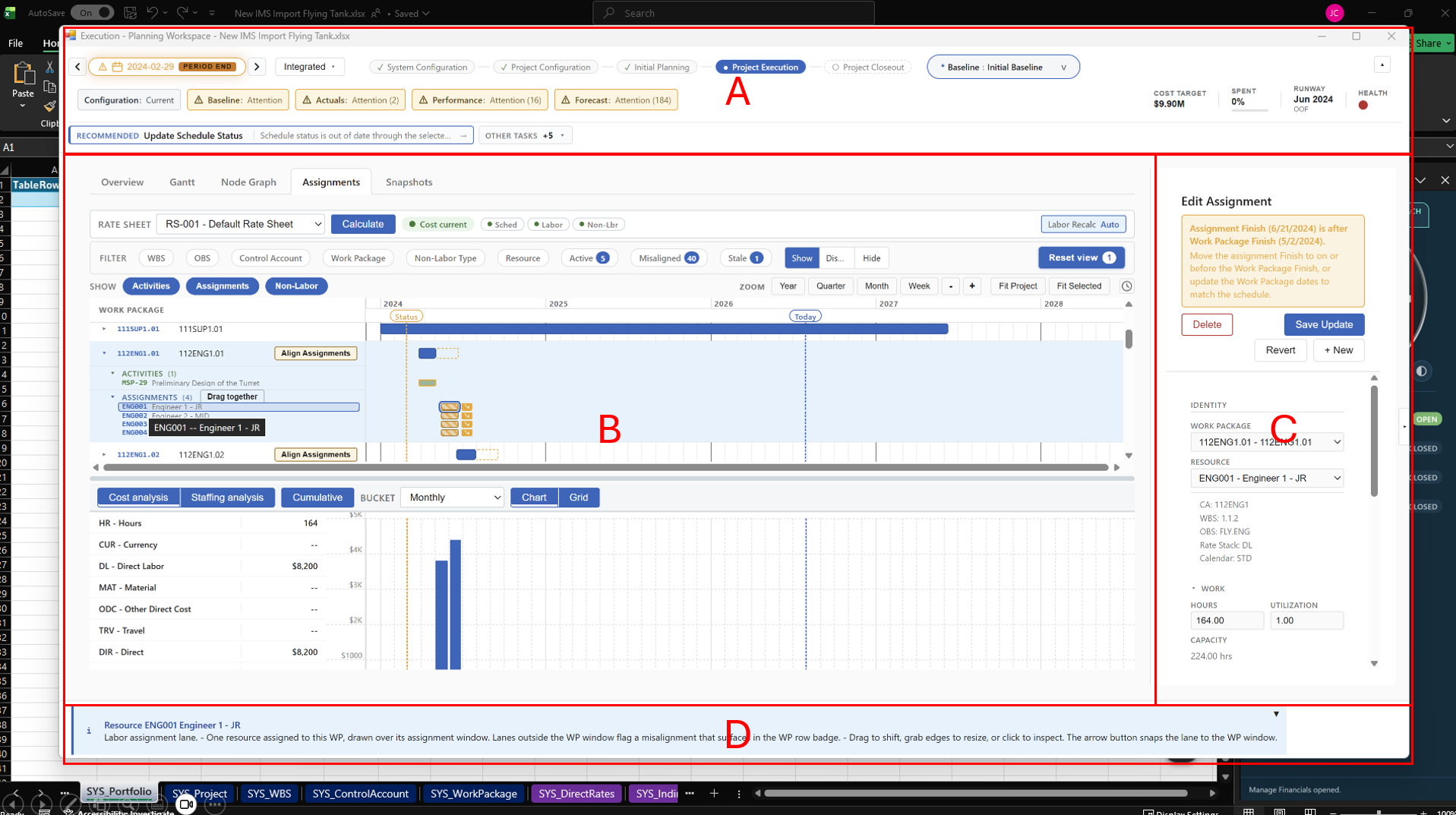
Region A is the primary guidance surface and the place where the Journey System becomes most visible. The first line keeps the user oriented by showing the current journey context and where the user sits in the lifecycle. The second line is the chip strip, which gives a quick reading of important project conditions such as configuration, baseline, actuals, performance, and forecast, so the user can see where attention is needed without leaving the current surface. The third line is the action-oriented layer, where the system projects recommended work, available work, blocked work, and active workflows. Together these lines help the user understand not just the condition of the project, but what the runtime believes should happen next.
Region B is where the main workspace or lens for the current kind of work is presented. This is the area where the user spends time working in schedules, planning views, financial views, or other governed surfaces that belong to the active journey. Region B is not responsible for deciding what the user should do next, but it is where the chosen task is carried out once the Journey System has established the context.
Region C is the detail workspace. It is where more specific edits, focused forms, and supporting data-entry surfaces can appear when the selected data record requires a closer level of interaction. If Region B is the main operating surface, Region C is where the user can drill into the particular record, configuration area, or edit context needed to complete the work without losing the broader journey frame.
Region D is the feedback region. It is where refusal messages, confirmations, explanations, and other forms of system response appear when the Journey System needs to tell the user why something is available, why something is blocked, or what happened after an action was attempted. Region D gives the runtime a place to explain itself clearly, so the user can understand both the outcome and the logic behind it.
Using AI with the Journey System
One of the practical advantages of the Journey System is that it creates a much stronger foundation for useful AI interactions. Because the runtime already knows the selected journey, the current stage, the relevant tasks, and the evidence coming from the workbook, an AI assistant does not have to start from a blank conversation. It can be given the same operating context the application is already using. That makes the interaction more focused and more data aware. Instead of responding with generic project advice, the AI can answer in a way that reflects the actual state of the project data and the point in the process where the user is currently working.
Just as important, the dependency runs in one direction. The Journey System does not depend on AI in order to work. It can evaluate evidence, determine availability, project recommendations, and guide the user on its own. AI depends on the Journey System for context so it can be more precise, better grounded, and more helpful. In other words, the journey model provides the structure, and AI becomes an additional layer of assistance that can use that structure to explain the current situation, answer narrower questions, and help the user move forward with a better understanding of what the project needs next.
The Goal: Faster Adoption and Better Results
The goal of the Journey System is to help users adopt a broader and more capable ProjectXL operating model without having to master every part of the platform on day one. By aligning the experience to the current journey, the current stage, and the current workbook evidence, the system can introduce capability in an order that makes sense. That lowers the barrier to entry for new users while still preserving the depth that more advanced users need as their projects become more integrated.
That same structure supports better results once the system is in use. When the runtime can tell the user what is ready, what is blocked, what needs attention, and what should happen next, the project is less dependent on memory, guesswork, or informal process discipline. Users spend less time figuring out where to go and more time completing the work that actually moves the project forward. In practical terms, the result is a product that is easier to adopt, easier to trust, and better able to help teams work through planning and control with consistency over time.