An Introduction to the PMI Practice Standard for Scheduling Conformance Index
PMI's Practice Standard for Scheduling includes a way to score a schedule model, the Conformance Index. Here is how it works, and how to assess its components in whatever tool you use.
Recently while studying for the PMI-SP certification I found something in PMI's Practice Standard for Scheduling that I hadn't known existed: a Conformance Index that scores a schedule model against the standard itself. I knew the NDIA Planning and Scheduling Excellence Guide and the GAO Schedule Assessment Guide well. This Conformance Index was new to me, and I suspect it is new to most schedulers. So, what is it?
In the standard's words, "The conformance index provides a means to assess how well a CPM schedule model incorporates the guidelines, definitions, behaviors, and good practices for the components as defined in Section 4 of this practice standard" (p. 137). Turns out the Conformance Index is intended to be another way to assess schedule health, like the DCMA 14 Point health check. Intrigued, I started reading more!
This article explains how I believe the index is intended to work and walks through assessing a component in two different tools. This article is the first in a series that takes the index one group at a time, looks at how it fits PMI's view of a project, and compares it with the other major guides.
How PMI Understands CPM Schedules
The Practice Standard starts from a simple chain. A scheduling method, usually the critical path method, is applied in a scheduling tool to build a schedule model. Each status update or revision produces an instance of that model. From each instance come the presentations people actually see: Gantt charts, network diagrams and reports (Section 2, pp. 28–31).
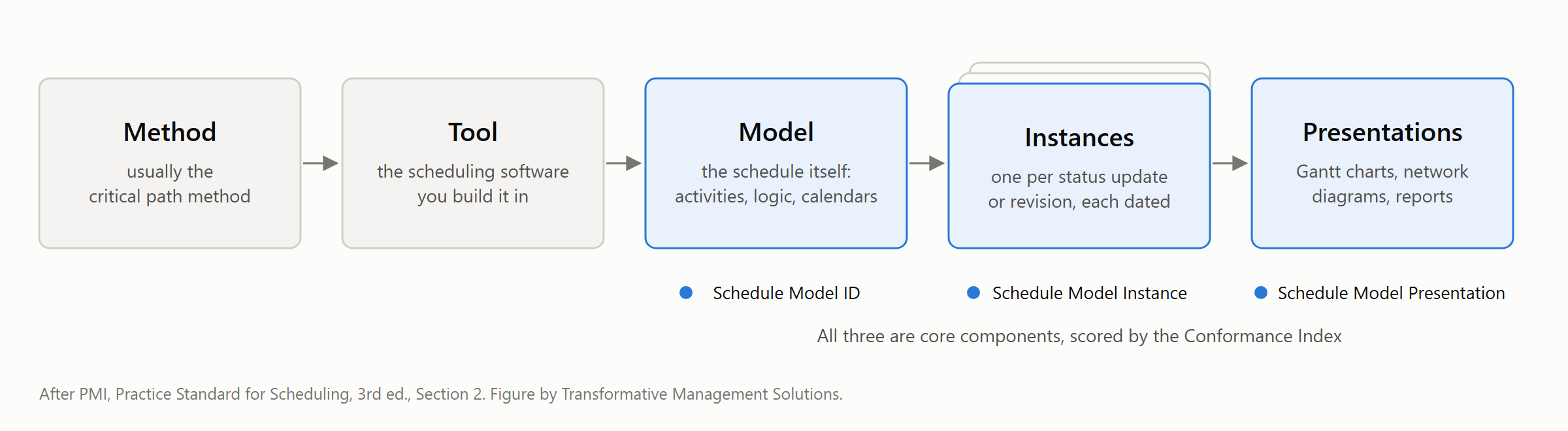
Section 3 follows the model through its life: managing, creating, maintaining, analyzing and communicating it. Section 4 breaks it into building blocks called components, such as activities, relationships, float, calendars and baselines, each with its own good practices. Those components are what the index scores.
The chain itself is on the scorecard. Schedule Model ID, Schedule Model Instance and Schedule Model Presentation are all core components. Hold that thought for Example 2.
Use: Required Groups, Optional and Not Scored
Table 4-1 lists the components by category, the subject they belong to: calendars, constraints, durations, earned value, float, relationships, resources, schedule risk and so on. For scoring, what matters is the table's Use column. It marks each component as required, optional or not scored, and Section 5.1.1 divides the required components into four groups: core, resource, EVM and risk. A component's Use decides whether it is required on your project, optional, or not counted at all.
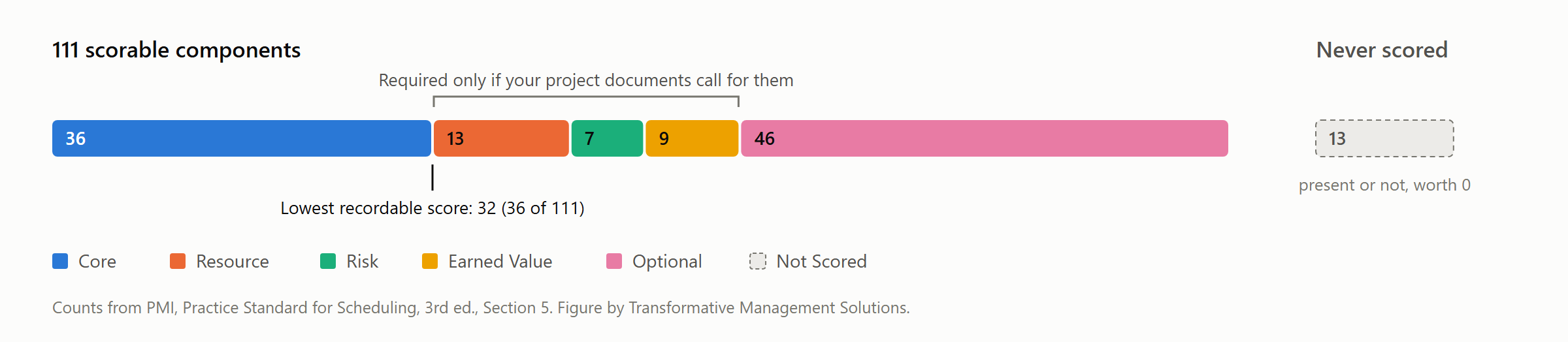
Core-required (CRC, 36) is always required. It covers the logic and network (relationships, float, the critical path), time and status (the data date, and actual, original and remaining durations), and the model itself (its ID, instances, baseline and presentations).
Three conditional groups are required only when your project's documents ask for them. That means the contract, the schedule management plan or your organization's process assets:
- Resource-required (RRC, 13), when the schedule must be resource-loaded: the resources, their calendars and availability, their assignments and quantities.
- Risk-required (KRC, 7), when schedule risk analysis is required: three-point durations, distributions, probability and criticality results, and risk IDs.
- EVM-required (ERC, 9), when EVM, including earned schedule, is required: the cost and value measures, and the control account and work package IDs that tie the schedule to cost.
If your documents don't require a group, its components don't disappear. They become optional.
Optional (46) components, such as lags, start-to-start links, activity calendars, hammocks and level of effort, add a point only when they are used properly, and never just to lift the score.
Not Scored (13) components never count: As Late As Possible, the date constraints, leads and start-to-finish links. Not scored isn't the same as forbidden, though. As Soon As Possible, the standard's expected default, is marked Not Scored too.
A note for careful readers: WBS ID is core-required in its own entry (p. 136), but Tables 4-1 and X3-1 put it in the EVM-required group.
So before you score anything, read your contract and your schedule management plan. They set your minimum.
How Scoring Works
Each component that is present and used according to the standard's good practices earns one point. Your score is the points earned divided by 111, as a percentage (Section 5.1.3, pp. 138–139).
The required components are a gate. If any component your project requires is missing or misused, the schedule isn't placed on the scale at all. It is recorded as one that "does not meet minimum conformance standards" (p. 139). That is why the lowest recordable score is 32: all 36 core components and nothing else. And presence is not enough: a field that is filled in but misused earns nothing.
The standard is candid about its own limits: "A higher conformance index value does not automatically imply a better schedule model" (p. 141). The index measures how well the model is built, not whether the plan is wise.
Examples of Assessing a Component
Many components are, in the standard's phrase, "scheduling tool dependent", so every assessment starts by finding where your tool keeps the component. My buddy Claude suggests using four questions:
- Where does my tool keep it? It may be a field with a different name, a feature, or nowhere at all.
- Is it there? For every activity, or for the model, as the component requires.
- Is it used the way the standard describes? Presence alone earns nothing.
- Can I show the evidence? A filter, a field, a saved record or an output.
Example 1: Activity Original Duration in Microsoft Project
Activity Original Duration is a core component (p. 104). It is the duration an activity was given before any progress, kept unchanged so it can be compared with actual and remaining duration. Its good practices are to record how each duration was estimated, and to keep durations within two or three reporting cycles.
Where does the tool keep it? Microsoft Project has no Original Duration field, and its Duration field changes as work progresses. In practice, original duration lives in Baseline Duration, which Set Baseline fills. Set Baseline copies each task's duration, dates, work and cost into the baseline fields. Running it again overwrites them, unless you use one of the numbered sets, Baseline1 to Baseline10. Tasks added later have no baseline until you set one for them.
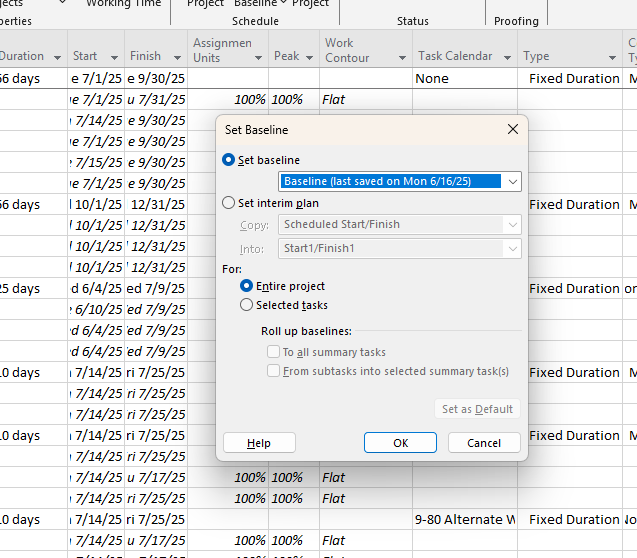
Is it there? Confirm that activities do have their baselines set, and be able identify those still pending a baseline snap.

Is it used properly? Is the baseline under some form of change management, and can you trace the changes to a change log that explains the details of the change as well as why it was made?
Can you show it? Are you able to compare the baseline before and after changes, or at different points in time?
In Microsoft Project, you can save up to 11 baselines at a time, but you would need a seperate log to track the justificaitons and approvals if you were to put the baseline under formal change control. Whether or not that is required is not something the standard specifies; it only talks about saving the "Activity Original Duration". As an EVM adherent, to me that means snapping the approved baseline, and my EVM System Description as well as my Schedule Management Plan would say something to that effect.
Example 2: Schedule Model Instance in ProjectXL
Schedule Model Instance is also core (p. 129). It describes the model rather than any one activity. It asks for a clear designation of which version you are looking at, such as an as-of date or a revision number, advanced consistently as the schedule changes.
Where does the tool keep it? In many tools, the instance is the file itself: a dated copy saved each period, or a version note kept by hand. In ProjectXL, it is the snapshot. You capture the plan as a baseline, official status or what-if snapshot, compare snapshots with the live plan, and set the active baseline. The project keeps pointers to the active baseline, the latest official schedule status and, on the Integrated journey, the latest official month-end status:
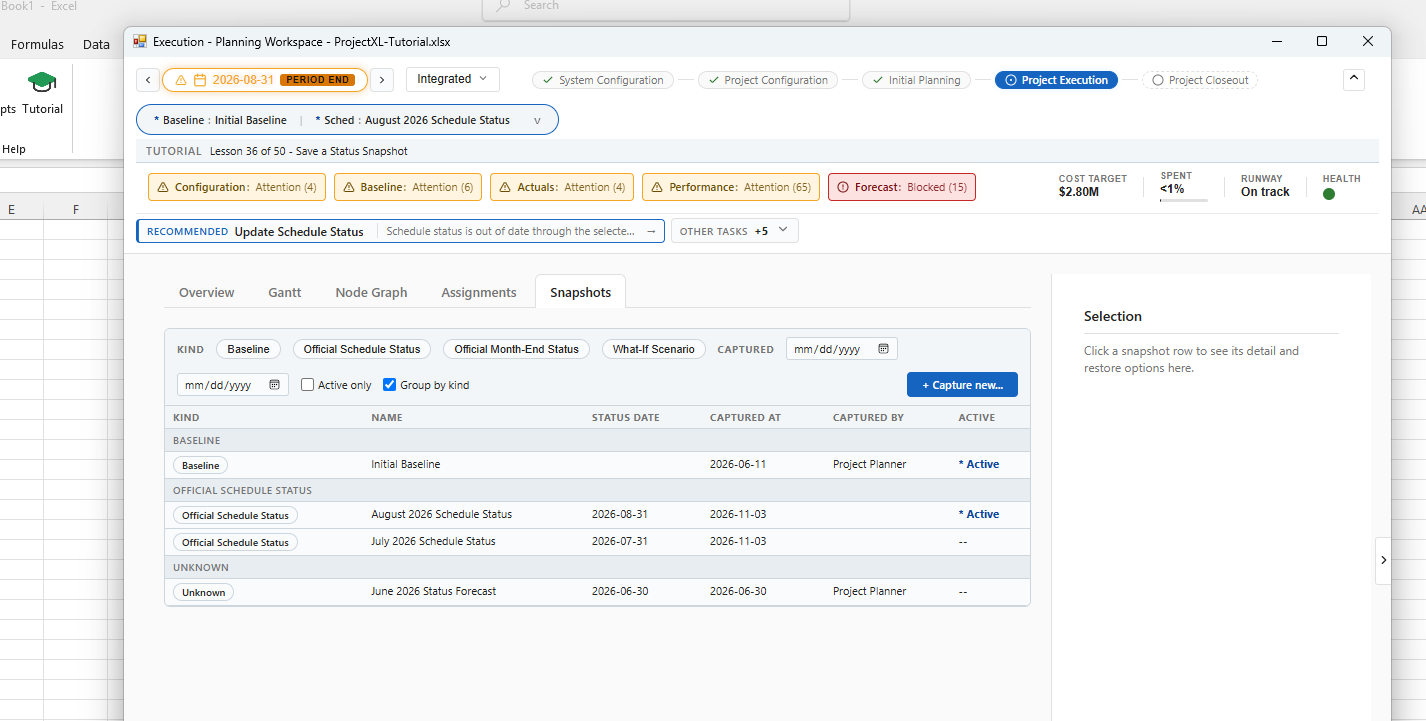
Is it there? One Official Schedule Status snapshot per status cycle, named to a consistent convention such as "June 2026 Status".
Is it used properly? Was each period's snapshot captured after statusing, with the "latest official" pointer moved forward each time? Can you show what changed between instances? A snapshot can be compared with the live plan or with another snapshot, with counts of added, changed and removed records for each work package. And a baseline can only be captured on a current, validated schedule, which keeps it tied to a calculated model.
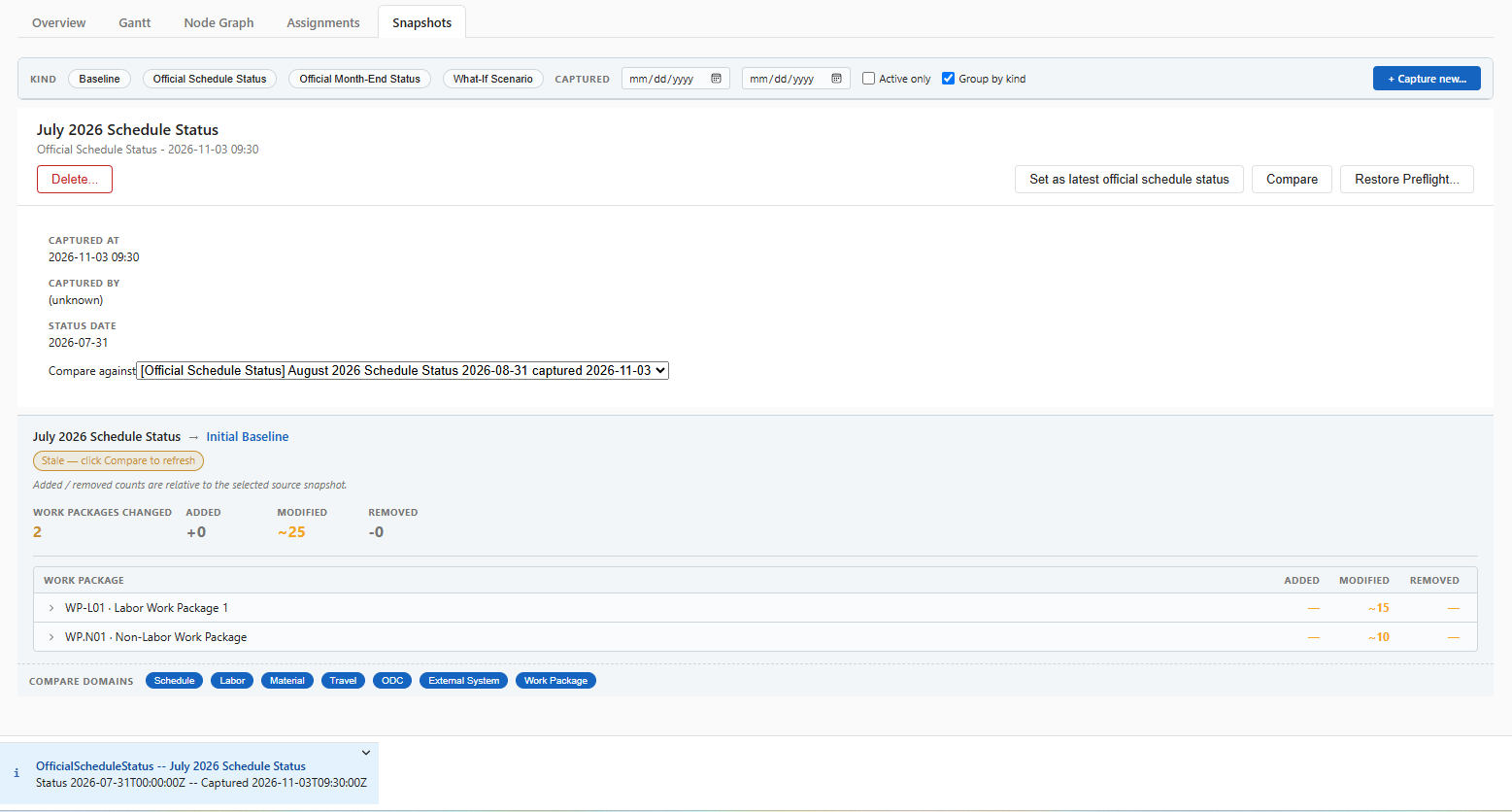
Can you show it? The snapshot list is the evidence. Reports are generated from saved snapshots for a chosen reporting period, so every output traces back to a named instance. That is instance to presentation, just as the chain describes.
A tool can help, but it can't do the job for you. Apart from the active ones, snapshots can be deleted, and ProjectXL keeps no permanent history of the plan. A complete instance history is still the scheduler's discipline.
The same four questions worked in two very different tools, and in both the answer depended as much on process as on software. Microsoft Project's Baseline Duration is original duration only if your process sets the baseline before progress and never re-saves over it. A ProjectXL snapshot is a schedule model instance only if your process captures one after every status cycle, names it consistently and keeps it. The tool decides where a component can live. The process built around the tool decides whether it conforms. Neither tool "does conformance" for you: write the process down, follow it every cycle, and the evidence the assessment needs is already there.
Next: The 36 Core Components
In our next article we will take on the Core group: the 36 components every schedule needs before it earns a score at all. We'll sort them into two kinds. Some are simple to evaluate in any schedule, because the file itself is the evidence: an Activity ID and Activity Label on every activity, finish-to-start logic, total and free float, a data date. Others, like the two in this article, can't be judged from the file alone. Activity Original Duration, Baseline Schedule Model, Schedule Model Instance and Schedule Model Presentation conform only when a defined procedure says how they are set, kept and used. Knowing which kind you're looking at tells you whether to fix the schedule or write the process.
After Core, the series moves on to the resource, risk and EVM groups, then the optional and not-scored components. Finally, we'll set the Conformance Index side by side with the DCMA 14-Point Assessment, the NDIA Planning and Scheduling Excellence Guide, the GAO Schedule Assessment Guide and other established practices, to see where they agree, where they differ, and what each one leaves out.
[TBD] A link to the MPUG webinar scheduled for November 18, 2026 will be added here when available.